Friday, 29 August 2014

Working with Keyword View

Introduction to QTP Keyword View
This article is going to give you an insight into the Keyword view of the QTP GUI. During this process we are going to get a quick introduction to Actions, Object Hierarchy and the basic columns in the keyword view.
Let’s start.
There is a drop-down box at the top and it shows “Action 1”.
What does this mean?
Introduction to Actions: Tests in QTP are recorded in terms of actions. Action is nothing but a set of statements performing a sequence of actions.  Most often an action is simply a logical unit of modularity. The calls to one or more actions can be defined as a QTP test.
For E.g.: Let’s assume that in an online web based email system, the user needs to login, compose and send email and then logout, it is recommended that each of these operations be divided into 3 different actions although all of them can be written under one action.
‘Test Email’ will have:
Action1>Login
Action2>Compose and send email
Action 3>Logout
The Test is essentially:
Call to Action1; Call to Action 2; Call to Action 3
If written in one action, the lines of script would be large and difficult to manipulate and maintain. So the logical division is recommended. Also, as we move on further in our exploration about Actions we are going to understand how actions can be parameterized thus enabling easy repetition of a certain action as many times as desired.
So when you create a new QTP test it contains a call to one action, “Action 1”.
When we expand the drop down, it shows the Test Flow. For a test with multiple actions it shows the sequence in which each action is called thus making the name, “Test Flow” self explanatory. This drop-down not only displays the sequence of actions, it also provides the option for the user to select or go-to a particular action to view and/or Edit.
There is also a “Reusable Actions” Folder view. For now, let’s just say that reusable actions can be used by multiple tests and multiple times in the same test where it was created. We are going to discuss in detail how that can be achieved. Every action by default is reusable. This can be changed if need be.
Let’s take a little diversion here and talk a little bit about Object recognition hierarchy in QTP.
Object Hierarchy – If you have noticed in our example the Agent Name and Password are displayed under the item Login. A point to note here is that, QTP uses a tree hierarchy to store objects. In our case, the Agent Name and Password are the child objects to the container object Login which is the Dialog. Container objects are window, dialog box in a windows based environment and web page in a web based environment.
Here is an example, the login Dialog of the flights application:

The container here is the Login dialog and next level objects are Agent name, Password and the other buttons and images in the dialog. There are only 2 levels here. But there could be more levels, like browser.page.button in this case, browser is a container for page and page is a container for button.
As you can see there are 4 columns- Item, Operation, Value and Documentation. The table can be expanded or collapsed by clicking on the little arrow next to the action name.
Item: Each step is a sequence of events performed on an item. The item can be one of the following:
  1. Test object (e.g.: Agent Name Edit box)
  2. Utility Object: These are some objects reserved by QTP to be used in tests. E.g.: DataTable object. More coming up on this later.
  3. Statement: Any VB Script programmatic statement or even comments
  4. Function call: like ‘msgbox’ call in our program
Operation: It shows the operation that is performed on the item. When this column is clicked for a particular item it lists all the available operations that can be performed on the object.

Value: This column can be considered as the argument of a statement displayed. In our example, the message box function call has a value “Text”. There can be multiple arguments to one statement in which case this column will be divided accordingly.
Documentation:  A read only column that translates a statement into easily understandable comments.
There are two other columns Assignment and Comment that can be added to the Keyword view table. To do so, the option to select is Tools->View Options and choose the required columns from the list displayed.
Assignment: This column is not very widely used and what this does is assigns a value to or gets a value from a variable.

Comments: The tester can write anything under this column. It will be treated as comments in the expert view.

Conclusion:

Well, that sums up an interesting insight into the basic capabilities of the QTP keyword view. Actions are logical units of separation in a test. A test is therefore a series of function calls. When a new test is creation it contains one call to an action. By default all the actions are reusable. QTP follows a multi-level hierarchy to recognize objects. An object that contains a next level of objects is called a container. There can be more than one level of containers in a test.
In the next article we will talk about way we can use this view to Insert Steps. Modify them, Insert checkpoints, Breakpoints and how we can manage actions.


Thursday, 28 August 2014

HP QuickTest Professional

HP Unified Functional Testing (UFT) software, formerly known as HP QuickTest Professional (QTP), provides functional and regression test automation for software applications and environments. HP Unified Functional Testing can be used for enterprise quality assurance.
HP Unified Functional Testing supports keyword and scripting interfaces and features a graphical user interface. It uses the Visual Basic Scripting Edition (VBScript) scripting language to specify a test procedure, and to manipulate the objects and controls of the application under test.
HP Unified Functional Testing was originally written by Mercury Interactive and called QuickTest Professional. Mercury Interactive was subsequently acquired by Hewlett Packard(HP) in 2006. HP Unified Functional Testing 11.5 combined HP QuickTest Professional and HP Service Test into a single software package, which is currently available from the HP Software Division. The integrated HP Unified Functional Testing software allows developers to test from a single console all three layers of a program’s operations: the interface, the service layer and the database layer.

User Interface

Keyword view

Keyword View lets users create and view the steps of a test in a modular, table format. Each row in the table represents a step that can be modified. The Keyword View can also contain any of the following columns: Item, Operation, Value, Assignment, Comment, and Documentation. For every step in the Keyword View, HP Unified Functional Testing displays a corresponding line of script based on the row and column value. Users can add, delete or modify steps at any point.
In Keyword View, users can also view properties for items such as checkpoints, output values, and actions, use conditional and loop statements, and insert breakpoints to assist in debugging a test.

Expert view
In Expert View, HP Unified Functional Testing lets users display and edit a test's source code using VBScript. Designed for more advanced users, users can edit all test actions except for the root Global action, and changes are synchronized with the Keyword View.


Versions
  • 5.5: First release: Released in 2001
  • 6.0: Released in 2002
  • 6.5: Released in 2003
  • 7.0: Never released
  • 8.0: Released in 2004
  • 8.2: Released in 2005
  • 9.0: Released in 2007
  • 9.1: Released in 2007
  • 9.2: Released in 2007
  • 9.5: Released in 2008
  • 10.0: Released in 2009
  • 11.0: Released in 2010
  • 11.5: Released in 2012 [renamed Unified Functional Testing]
  • 11.52: Released in June 2013
  • 11.53: Released in November 2013
  • 12.0: Released March 2014
  • 12.01: Released July 2014

Wednesday, 27 August 2014

Understanding Automation Testing

In software testingtest automation is the use of special software (separate from the software being tested) to control the execution of tests and the comparison of actual outcomes with predicted outcomes.Test automation can automate some repetitive but necessary tasks in a formalized testing process already in place, or add additional testing that would be difficult to perform manually.


Some software testing tasks, such as extensive low-level interface regression testing, can be laborious and time consuming to do manually. In addition, a manual approach might not always be effective in finding certain classes of defects. Test automation offers a possibility to perform these types of testing effectively. Once automated tests have been developed, they can be run quickly and repeatedly. Many times, this can be a cost-effective method for regression testing of software products that have a long maintenance life. Even minor patches over the lifetime of the application can cause existing features to break which were working at an earlier point in time.
There are many approaches to test automation, however below are the general approaches used widely:
  • Code-driven testing. The public (usually) interfaces to classes, modules or libraries are tested with a variety of input arguments to validate that the results that are returned are correct.
  • Graphical user interface testing. A testing framework generates user interface events such as keystrokes and mouse clicks, and observes the changes that result in the user interface, to validate that the observable behavior of the program is correct.
Test automation tools can be expensive, and are usually employed in combination with manual testing. Test automation can be made cost-effective in the long term, especially when used repeatedly in regression testing.
In automated testing the Test Engineer or Software quality assurance person must have software coding ability, since the test cases are written in the form of source code which, when run, produce output according to the assertions that are a part of it.
One way to generate test cases automatically is model-based testing through use of a model of the system for test case generation, but research continues into a variety of alternative methodologies for doing so. In some cases, the model-based approach enables non-technical users to create automated business test cases in plain English so that no programming of any kind is needed in order to configure them for multiple operating systems, browsers, and smart devices.
What to automate, when to automate, or even whether one really needs automation are crucial decisions which the testing (or development) team must make. Selecting the correct features of the product for automation largely determines the success of the automation. Automating unstable features or features that are undergoing changes should be avoided.

Benefits of Automation Testing

  • Fast: Runs tests significantly faster than human users.
  • Repeatable: Testers can test how the website or software reacts after repeated execution of the same operation.
  • Reusable: Tests can be re-used on different versions of the software.
  • Reliable: Tests perform precisely the same operation each time they are run thereby eliminating human error.
  • Comprehensive: Testers can build test suites of tests that covers every feature in software software application.
  • Programmable: Testers can program sophisticated tests that bring hidden information.

Right time for Automation

  • When application is stable.
  • No GUI changes.
  • Cannot be used for Re-testing.

Record and Playback

The central feature of first generation test automation tools, record & playback was especially useful for regression testing. For this method, every test case is a series of actions with test data hardcoded into it. While this approach required minimal coding at the beginning, the scripts were unstable and minor errors or changes in the data disrupted the automation. So, any small changes in the applications had to be made to the test case in order to run it.

Tuesday, 19 August 2014

Agile and Scrum Testing

Agile software development refers to a group of software development methodologies based on iterative development, where requirements and solutions evolve through collaboration between self-organizing cross-functional teams.
Agile methods or Agile processes generally promote a disciplined project management process that encourages frequent inspection and adaptation, a leadership philosophy that encourages teamwork, self-organization and accountability, a set of engineering best practices intended to allow for rapid delivery of high-quality software, and a business approach that aligns development with customer needs and company goals.

Scrum is a lightweight process framework for agile development, and the most widely-used one.
  • A “process framework” is a particular set of practices that must be followed in order for a process to be consistent with the framework. (For example, the Scrum process framework requires the use of development cycles called Sprints, the XP framework requires pair programming, and so forth.)
  • “Lightweight” means that the overhead of the process is kept as small as possible, to maximize the amount of productive time available for getting useful work done.
A Scrum process is distinguished from other agile processes by specific concepts and practices, divided into the three categories of Roles, Artifacts, and Time Boxes. These and other terms used in Scrum are defined below.
Scrum is most often used to manage complex software and product development, using iterative and incremental practices. Scrum significantly increases productivity and reduces time to benefits relative to classic “waterfall” processes. Scrum processes enable organizations to adjust smoothly to rapidly-changing requirements, and produce a product that meets evolving business goals.
An agile Scrum process benefits the organization by helping it to
  • Increase the quality of the deliverables
  • Cope better with change (and expect the changes)
  • Provide better estimates while spending less time creating them
  • Be more in control of the project schedule and state
As a result, Scrum projects achieve higher customer satisfaction rates.


Agile development refers to any development process that is aligned with the concepts of the Agile Manifesto. The Manifesto was developed by a group fourteen leading figures in the software industry, and reflects their experience of what approaches do and do not work for software development.

The Manifesto says:
We are uncovering better ways of developing software by doing it and helping others do it. Through this work we have come to value:
Individuals and interactions over processes and tools
Working software over comprehensive documentation
Customer collaboration over contract negotiation
Responding to change over following a plan
That is, while there is value in the items on the right, we value the items on the left more. The agile philosophy holds that the best way to meet customer needs is through the collaboration of a committed group of people, who focus on achieving results quickly, with as little process overhead as possible.
A key element of this philosophy is that we must trust people and their ability to collaborate, more than we trust any particular process. This principle follows from the fact that people can succeed without a formal process, but no process can succeed without people. For this reason, we should design an agile process that best taps the abilities of team members by emphasizing collaboration, rather than relying on the structure of a process to guarantee success.
The Agile Manifesto does not specify any particular practices that a development team should follow. Specific agile process frameworks, such as Scrum and XP, do define practices that must be followed.

Roles

The three roles defined in Scrum are the ScrumMaster, the Product Owner, and the Team (which consists of Team members). The people who fulfill these roles work together closely, on a daily basis, to ensure the smooth flow of information and the quick resolution of issues.

ScrumMaster

The ScrumMaster (sometimes written “Scrum Master,” although the official term has no space after “Scrum”) is the keeper of the process. He is responsible for making the process run smoothly, for removing obstacles that impact productivity, and for organizing and facilitating the critical meetings.
The ScrumMasters responsibilities include
  • Removing the barriers between the development Team and the Product Owner so that the Product Owner directly drives development.
  • Teach the Product Owner how to maximize return on investment (ROI), and meet his/her objectives through Scrum.
  • Improve the lives of the development Team by facilitating creativity and empowerment.
  • Improve the productivity of the development Team in any way possible.
  • Improve the engineering practices and tools so that each increment of functionality is potentially shippable.
  • Keep information about the Team’s progress up to date and visible to all parties.

In practical terms, the ScrumMaster needs to understand Scrum well enough to train and mentor the other roles, and educate and assist other stakeholders who are involved in the process. He should maintain a constant awareness of the status of the project (its progress to date) relative to the expected progress, investigate and facilitate resolution of any roadblocks that hold back progress, and generally be flexible enough to identify and deal with any issues that arise, in any way that is required. He must protect the Team from disturbance from other people by acting as the interface between the two.
The ScrumMaster does not assign tasks to Team members, as task assignment is a Team responsibility. His general approach towards the Team is to encourage and facilitate their decision-making and problem-solving capabilities, so that they can work with increasing efficiency and decreasing need for supervision. His goal is to have a team that is not only empowered to make important decisions, but does so well and routinely.

Product Owner

The Product Owner is the keeper of the requirements. He provides the “single source of truth” for the Team regarding requirements and their planned order of implementation.
In practice, the Product Owner is the interface between the business, the customers, and their product related needs on one side, and the Team on the other. He buffers the Team from feature and bug-fix requests that come from many sources, and is the single point of contact for all questions about product requirements. He works closely with the team to define the user-facing and technical requirements, to document the requirements as needed, and to determine the order of their implementation. He maintains the Product Backlog (which is the repository for all of this information), keeping it up to date and at the level of detail and quality the Team requires.
The Product Owner also sets the schedule for releasing completed work to customers, and makes the final call as to whether implementations have the features and quality required for release.

Team

The Team is a self-organizing and cross-functional group of people who do the hands-on work of developing and testing the product. Since the Team is responsible for producing the product, it must also have the authority to make decisions about how to perform the work. The Team is therefore self-organizing: Team members decide how to break work into tasks, and how to allocate tasks to individuals, throughout the Sprint.
The Team size should be kept in the range from five to nine people, if possible. (A larger number make communication difficult, while a smaller number leads to low productivity and fragility.)
Note: A very similar term, “Scrum Team,” refers to the Team plus the ScrumMaster and Product Owner.


Wednesday, 13 August 2014

Bugbase fundamentals-2

Bug Scrub

It is a process of reviewing and cleaning of bugs written by other people(non- testers).

Bug triage

Defect triage is a process where in majority of the project stake holders to go though new, existing defects and decide on the action items.  During defect triage meeting are conducted weekly or bi weekly depending on the state of the project.  During defect triage, stake holders go through the following

- New defects that were logged after last defect triage meeting.  Assign or reject them based on the findings.
- Reassign defect(s) as needed.
- Review all open high severity and priority defects
- Discuss about defects that are in dispute between development and test teams.
- Finalize on priorities on upcoming defect fix and verification.

Bug verification

Bug verification is done to verify that bugs are properly fixed and to check that the fixes don’t yield any new issues. This is a very important part of the QA work and one of the more challenging areas of community involvement.
This event is open to everyone wanting to help make Firefox better. We usually advertise it on QMO and IRC every week, so you don't miss any updates.

Monday, 11 August 2014

What is the difference between Severity and Priority?

There are two key things in defects of the software testing. They are:
1)     Severity
2)     Priority
What is the difference between Severity and Priority?
1)  Severity:
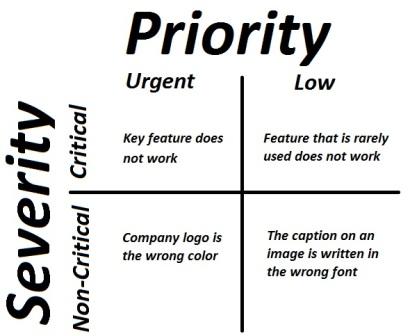
It is the extent to which the defect can affect the software. In other words it defines the impact that a given defect has on the system. For example: If an application or web page crashes when a remote link is clicked, in this case clicking the remote link by an user is rare but the impact of  application crashing is severe. So the severity is high but priority is low.
Severity can be of following types:
  • Critical: The defect that results in the termination of the complete system or one or more component of the system and causes extensive corruption of the data. The failed function is unusable and there is no acceptable alternative method to achieve the required results then the severity will be stated as critical.
  • Major: The defect that results in the termination of the complete system or one or more component of the system and causes extensive corruption of the data. The failed function is unusable but there exists an acceptable alternative method to achieve the required results then the severity will be stated as major.
  • Moderate: The defect that does not result in the termination, but causes the system to produce incorrect, incomplete or inconsistent results then the severity will be stated as moderate.
  • Minor: The defect that does not result in the termination and does not damage the usability of the system and the desired results can be easily obtained by working around the defects then the severity is stated as minor.
  • Cosmetic: The defect that is related to the enhancement of the system where the changes are related to the look and field of the application then the severity is stated as cosmetic.
2)  Priority:
Priority defines the order in which we should resolve a defect. Should   we fix it now, or can it wait? This priority status is set by the tester to the developer mentioning the time frame to fix the defect. If high priority is mentioned then the developer has to fix it at the earliest. The priority status is set based on the customer requirements. For example: If the company name is misspelled in the home page of the website, then the priority is high and severity is low to fix it.
Priority can be of following types:
  • Low: The defect is an irritant which should be repaired, but repair can be deferred until after more serious defect have been fixed.
  • Medium: The defect should be resolved in the normal course of development activities. It can wait until a new build or version is created.
  • High: The defect must be resolved as soon as possible because the defect is affecting the application or the product severely. The system cannot be used until the  repair has been done.
Few very important scenarios related to the severity and priority which are asked during the interview:
High Priority & High Severity: An error which occurs on the basic functionality of the application and will not allow the user to use the system. (Eg. A site maintaining the student details, on saving record if it, doesn’t allow to save the record then this is high priority and high severity bug.)
High Priority & Low Severity: The spelling mistakes that happens on the cover page or heading or title of an application.
High Severity & Low Priority: An error which occurs on the functionality of the application (for which there is no workaround) and will not allow the user to use the system but on click of link which is rarely used by the end user.
Low Priority and Low Severity: Any cosmetic or spelling issues which is within a paragraph or in the report 

Saturday, 9 August 2014

Bugbase Fundamentals

Bug Tracking System

bug tracking system or defect tracking system is a software application that keeps track of reported software bugs in software development projects. It may be regarded as a type of issue tracking system.
Many bug tracking systems, such as those used by most open source software projects, allow end-users to enter bug reports directly. Other systems are used only internally in a company or organization doing software development. Typically bug tracking systems are integrated with other software project management applications.
A bug tracking system is usually a necessary component of a good software development infrastructure, and consistent use of a bug or issue tracking system is considered one of the "hallmarks of a good software team".

What is difference between Priority and Severity?

Priority:
  • Priority means how fast it has to be fixed.
  • Priority is related to scheduling to resolve the problem.
  • Severity means how severe it is affecting the functionality.
  • Is largely related to Business or Marketing aspect. It is a pointer towards the importance of the bug.
  • The priority status is set based on the customer requirements.
  • Is related to technical aspect of the product. It reflects on how bad the bug is for the system.
  • Priority means how urgently the issue can be fixed.
  • Product manager is to decide the Priority to fix a bug.
  • Based on ‘Project Priorities the product fixes are done.
  • The Priority status is set by the tester to the developer mentioning the time frame to fix a defect. If High priority is mentioned then the developer has to fix it at the earliest.
Severity:
  • It is totally related to the quality standard or devotion to standard.
  • Severity means how severe it is affecting the functionality.
  • Severity is associated with standards.
  • The severity type is defined by the tester based on the written test cases and functionality.
  • Is related to technical aspect of the product. It reflects on how bad the bug is for the system.
  • It is totally related to the quality standard or devotion to standard.
  • Severity means how big functionality is affecting of the product.
  • The Test Engineer can decide the severity level of the bug.
  • Based on Bug Severity the product fixes are done.
  • Also we can say The Severity status is used to explain how badly the deviation is affecting the build.
The severity is assigned by tester. Based on seriousness of the bug severity is assigned to defect. It can be divided into four categories:
Show Stopper: 4 – Cannot able to test application further.
Major Defect: 3 – Major functionality not working but able to test application.
Minor Defect: 2 –Bug in Functionality but in the sub module or one under the other module.
Cosmetic: 1 – Issues in location of the object or the look and feel issue.
Let discuss few examples of Priority & Severity from High to Low:
High Priority & High Severity:
  1. All show stopper bugs would be added under this category (I mean to say tester should log Severity as High, to set up Priority as High is Project manager’s call), means bug due to which tester is not able to continue with the Software Testing, Blocker Bugs.
  2. Let’s take an example of High Priority & High Severity, Upon login to system “Run time error” displayed on the page, so due to which tester is not able to proceed the testing further.
High Priority & Low Severity:
  1.  On the home page of the company’s web site spelling mistake in the name of the company is surely a High Priority issue. In terms of functionality it is not breaking anything so we can mark as Low Severity, but making bad impact on the reputation of company site. So it highest priority to fix this.
Low Priority & High Severity:
  1. The download Quarterly statement is not generating correctly from the website & user is already entered in quarter in last month. So we can say such bugs as High Severity, this is bugs occurring while generating quarterly report. We have time to fix the bug as report is generated at the end of the quarter so priority to fix the bug is Low.
  2. System is crashing in the one of the corner scenario, it is impacting major functionality of system so the Severity of the defect is high but as it is corner scenario so many of the user not seeing this page we can mark it as Low Priority by project manager since many other important bugs are likely to fix before doing high priority bugs because high priority bugs are can be visible to client or end user first.
Low Priority & Low Severity:
  1. Spelling mistake in the confirmation error message like “You have registered success” instead of successfully, success is written.
  2. Developer is missed remove cryptic debug information shortcut key which is used developer while developing he application, if you pressing the key combination LEFT_ALT+LEFT_CTRL+RIGHT_CTRL+RIGHT_ALT+F5+F10 for 1 mins.
It is where rare scenario where user can hold the key for such long period of time so bug should be marked as low priority.

Wednesday, 6 August 2014

Bug report

BUG REPORT

Why good Bug report?
If your bug report is effective, chances are higher that it will get fixed. So fixing a bug depends on how effectively you report it. Reporting a bug is nothing but a skill and I will tell you how to achieve this skill.
“The point of writing problem report(bug report) is to get bugs fixed” – By Cem Kaner. If tester is not reporting bug correctly, programmer will most likely reject this bug stating as irreproducible. This can hurt testers moral and some time ego also. (I suggest do not keep any type of ego. Ego’s like “I have reported bug correctly”, “I can reproduce it”, “Why he/she has rejected the bug?”, “It’s not my fault” etc etc..)
What are the qualities of a good software bug report?
Anyone can write a bug report. But not everyone can write a effective bug report. You should be able to distinguish between average bug report and a good bug report. How to distinguish a good or bad bug report? It’s simple, apply following characteristics and techniques to report a bug.
1) Having clearly specified bug number:
Always assign a unique number to each bug report. This will help to identify the bug record. If you are using any automated bug-reporting tool then this unique number will be generated automatically each time you report the bug. Note the number and brief description of each bug you reported.
2) Reproducible:
If your bug is not reproducible it will never get fixed. You should clearly mention the steps to reproduce the bug. Do not assume or skip any reproducing step. Step by step described bug problem is easy to reproduce and fix.
3) Be Specific:
Do not write a essay about the problem. Be Specific and to the point. Try to summarize the problem in minimum words yet in effective way. Do not combine multiple problems even they seem to be similar. Write different reports for each problem.
How to Report a Bug?
Use following simple Bug report template:
This is a simple bug report format. It may vary on the bug report tool you are using. If you are writing bug report manually then some fields need to specifically mention like Bug number which should be assigned manually.
Reporter: Your name and email address.
Product: In which product you found this bug.
Version: The product version if any.
Component: These are the major sub modules of the product.
Platform: Mention the hardware platform where you found this bug. The various platforms like ‘PC’, ‘MAC’, ‘HP’, ‘Sun’ etc.
Operating system: Mention all operating systems where you found the bug. Operating systems like Windows, Linux, Unix, SunOS, Mac OS. Mention the different OS versions also if applicable like Windows NT, Windows 2000, Windows XP etc.
Priority:
When bug should be fixed? Priority is generally set from P1 to P5. P1 as “fix the bug with highest priority” and P5 as ” Fix when time permits”.
Severity:
This describes the impact of the bug.
Types of Severity:
  • Blocker: No further testing work can be done.
  • Critical: Application crash, Loss of data.
  • Major: Major loss of function.
  • Minor: minor loss of function.
  • Trivial: Some UI enhancements.
  • Enhancement: Request for new feature or some enhancement in existing one.
Status:
When you are logging the bug in any bug tracking system then by default the bug status is ‘New’.
Later on bug goes through various stages like Fixed, Verified, Reopen, Won’t Fix etc.
Assign To: 
If you know which developer is responsible for that particular module in which bug occurred, then you can specify email address of that developer. Else keep it blank this will assign bug to module owner or Manger will assign bug to developer. Possibly add the manager email address in CC list.
URL:
The page url on which bug occurred.
Summary:
A brief summary of the bug mostly in 60 or below words. Make sure your summary is reflecting what the problem is and where it is.
Description:
A detailed description of bug. Use following fields for description field:
  • Reproduce steps: Clearly mention the steps to reproduce the bug.
  • Expected result: How application should behave on above mentioned steps.
  • Actual result: What is the actual result on running above steps i.e. the bug behavior.
These are the important steps in bug report. You can also add the “Report type” as one more field which will describe the bug type.
The report types are typically:
1) Coding error
2) Design error
3) New suggestion
4) Documentation issue
5) Hardware problem
Some Bonus tips to write a good bug report:
1) Report the problem immediately:If you found any bug while testing, do not wait to write detail bug report later. Instead write the bug report immediately. This will ensure a good and reproducible bug report. If you decide to write the bug report later on then chances are high to miss the important steps in your report.
2) Reproduce the bug three times before writing bug report:Your bug should be reproducible. Make sure your steps are robust enough to reproduce the bug without any ambiguity. If your bug is not reproducible every time you can still file a bug mentioning the periodic nature of the bug.
3) Test the same bug occurrence on other similar module:
Sometimes developer use same code for different similar modules. So chances are high that bug in one module can occur in other similar modules as well. Even you can try to find more severe version of the bug you found.
4) Write a good bug summary:
Bug summary will help developers to quickly analyze the bug nature. Poor quality report will unnecessarily increase the development and testing time. Communicate well through your bug report summary. Keep in mind bug summary is used as a reference to search the bug in bug inventory.
5) Read bug report before hitting Submit button:
Read all sentences, wording, steps used in bug report. See if any sentence is creating ambiguity that can lead to misinterpretation. Misleading words or sentences should be avoided in order to have a clear bug report.
6) Do not use Abusive language:
It’s nice that you did a good work and found a bug but do not use this credit for criticizing developer or to attack any individual.
Conclusion:
No doubt that your bug report should be a high quality document. Focus on writing good bug reports, spend some time on this task because this is main communication point between tester, developer and manager. Mangers should make aware to their team that writing a good bug report is primary responsibility of any tester. Your efforts towards writing good bug report will not only save company resources but also create a good relationship between you and developers.
For better productivity write a better bug report.