Friday, 28 June 2013

28th june 2013

SQL is followed by unique set of rules and guidelines called Syntax. This tutorial gives you a quick start with SQL by listing all the basic SQL Syntax:
All the SQL statements start with any of the keywords like SELECT, INSERT, UPDATE, DELETE, ALTER, DROP, CREATE, USE, SHOW and all the statements end with a semicolon (;).
Important point to be noted is that SQL is case insensitive, which means SELECT and select have same meaning in SQL statements, but MySQL makes difference in table names. So if you are working with MySQL, then you need to give table names as they exist in the database.

SQL SELECT Statement:

SELECT column1, column2....columnN
FROM   table_name;

SQL DISTINCT Clause:

SELECT DISTINCT column1, column2....columnN
FROM   table_name;

SQL WHERE Clause:

SELECT column1, column2....columnN
FROM   table_name
WHERE  CONDITION;

SQL AND/OR Clause:

SELECT column1, column2....columnN
FROM   table_name
WHERE  CONDITION-1 {AND|OR} CONDITION-2;

SQL IN Clause:

SELECT column1, column2....columnN
FROM   table_name
WHERE  column_name IN (val-1, val-2,...val-N);

SQL BETWEEN Clause:

SELECT column1, column2....columnN
FROM   table_name
WHERE  column_name BETWEEN val-1 AND val-2;

SQL LIKE Clause:

SELECT column1, column2....columnN
FROM   table_name
WHERE  column_name LIKE { PATTERN };

SQL ORDER BY Clause:

SELECT column1, column2....columnN
FROM   table_name
WHERE  CONDITION
ORDER BY column_name {ASC|DESC};

SQL GROUP BY Clause:

SELECT SUM(column_name)
FROM   table_name
WHERE  CONDITION
GROUP BY column_name;

SQL COUNT Clause:

SELECT COUNT(column_name)
FROM   table_name
WHERE  CONDITION;

SQL HAVING Clause:

SELECT SUM(column_name)
FROM   table_name
WHERE  CONDITION
GROUP BY column_name
HAVING (arithematic function condition);

SQL CREATE TABLE Statement:

CREATE TABLE table_name(
column1 datatype,
column2 datatype,
column3 datatype,
.....
columnN datatype,
PRIMARY KEY( one or more columns )
);

SQL DROP TABLE Statement:

DROP TABLE table_name;

SQL CREATE INDEX Statement :

CREATE UNIQUE INDEX index_name
ON table_name ( column1, column2,...columnN);

SQL DROP INDEX Statement :

ALTER TABLE table_name
DROP INDEX index_name;

SQL DESC Statement :

DESC table_name;

SQL TRUNCATE TABLE Statement:

TRUNCATE TABLE table_name;

SQL ALTER TABLE Statement:

ALTER TABLE table_name {ADD|DROP|MODIFY} column_name {data_ype};

SQL ALTER TABLE Statement (Rename) :

ALTER TABLE table_name RENAME TO new_table_name;

SQL INSERT INTO Statement:

INSERT INTO table_name( column1, column2....columnN)
VALUES ( value1, value2....valueN);

SQL UPDATE Statement:

UPDATE table_name
SET column1 = value1, column2 = value2....columnN=valueN
[ WHERE  CONDITION ];

SQL DELETE Statement:

DELETE FROM table_name
WHERE  {CONDITION};

SQL CREATE DATABASE Statement:

CREATE DATABASE database_name;

SQL DROP DATABASE Statement:

DROP DATABASE database_name;

SQL USE Statement:

USE DATABASE database_name;

SQL COMMIT Statement:

COMMIT;

SQL ROLLBACK Statement:

ROLLBACK;


Creating a basic table involves naming the table and defining its columns and each column's data type.
The SQL CREATE TABLE statement is used to create a new table.

Syntax:

Basic syntax of CREATE TABLE statement is as follows:
CREATE TABLE table_name(
   column1 datatype,
   column2 datatype,
   column3 datatype,
   .....
   columnN datatype,
   PRIMARY KEY( one or more columns )
);
CREATE TABLE is the keyword telling the database system what you want to do. In this case, you want to create a new table. The unique name or identifier for the table follows the CREATE TABLE statement.
Then in brackets comes the list defining each column in the table and what sort of data type it is. The syntax becomes clearer with an example below.
A copy of an existing table can be created using a combination of the CREATE TABLE statement and the SELECT statement. You can check complete details at Create Table Using another Table.

Example:

Following is an example, which creates a CUSTOMERS table with ID as primary key and NOT NULL are the constraints showing that these fields can not be NULL while creating records in this table:
SQL> CREATE TABLE CUSTOMERS(
   ID   INT              NOT NULL,
   NAME VARCHAR (20)     NOT NULL,
   AGE  INT              NOT NULL,
   ADDRESS  CHAR (25) ,
   SALARY   DECIMAL (18, 2),       
   PRIMARY KEY (ID)
);
You can verify if your table has been created successfully by looking at the message displayed by the SQL server, otherwise you can use DESC command as follows:
SQL> DESC CUSTOMERS;
+---------+---------------+------+-----+---------+-------+
| Field   | Type          | Null | Key | Default | Extra |
+---------+---------------+------+-----+---------+-------+
| ID      | int(11)       | NO   | PRI |         |       |
| NAME    | varchar(20)   | NO   |     |         |       |
| AGE     | int(11)       | NO   |     |         |       |
| ADDRESS | char(25)      | YES  |     | NULL    |       |
| SALARY  | decimal(18,2) | YES  |     | NULL    |       |
+---------+---------------+------+-----+---------+-------+
5 rows in set (0.00 sec)
Now, you have CUSTOMERS table available in your database which you can use to store required information related to customers.

Thursday, 27 June 2013

27th june 2013

SQL tutorial gives unique learning on Structured Query Language and it helps to make practice on SQL commands which provides immediate results. SQL is a language of database, it includes database creation, deletion, fetching rows and modifying rows etc.
SQL is an ANSI (American National Standards Institute) standard but there are many different versions of the SQL language.

What is SQL?

SQL is Structured Query Language, which is a computer language for storing, manipulating and retrieving data stored in relational database.
SQL is the standard language for Relation Database System. All relational database management systems like MySQL, MS Access, Oracle, Sybase, Informix, postgres and SQL Server use SQL as standard database language.
Also, they are using different dialects, such as:
  • MS SQL Server using T-SQL,
  • Oracle using PL/SQL,
  • MS Access version of SQL is called JET SQL (native format) etc.

Why SQL?

  • Allows users to access data in relational database management systems.
  • Allows users to describe the data.
  • Allows users to define the data in database and manipulate that data.
  • Allows to embed within other languages using SQL modules, libraries & pre-compilers.
  • Allows users to create and drop databases and tables.
  • Allows users to create view, stored procedure, functions in a database.
  • Allows users to set permissions on tables, procedures, and views

History:

  • 1970 -- Dr. E. F. "Ted" of IBM is known as the father of relational databases. He described a relational model for databases.
  • 1974 -- Structured Query Language appeared.
  • 1978 -- IBM worked to develop Codd's ideas and released a product named System/R.
  • 1986 -- IBM developed the first prototype of relational database and standardized by ANSI. The first relational database was released by Relational Software and its later becoming Oracle.

SQL Process:

When you are executing an SQL command for any RDBMS, the system determines the best way to carry out your request and SQL engine figures out how to interpret the task.
There are various components included in the process. These components are Query Dispatcher, Optimization Engines, Classic Query Engine and SQL Query Engine, etc. Classic query engine handles all non-SQL queries but SQL query engine won't handle logical files.
Following is a simple diagram showing SQL Architecture:
SQL Architecture

SQL Commands:

The standard SQL commands to interact with relational databases are CREATE, SELECT, INSERT, UPDATE, DELETE and DROP. These commands can be classified into groups based on their nature:

DDL - Data Definition Language:

CommandDescription
CREATECreates a new table, a view of a table, or other object in database
ALTERModifies an existing database object, such as a table.
DROPDeletes an entire table, a view of a table or other object in the database.

DML - Data Manipulation Language:

CommandDescription
INSERTCreates a record
UPDATEModifies records
DELETEDeletes records

DCL - Data Control Language:

CommandDescription
GRANTGives a privilege to user
REVOKETakes back privileges granted from user

DQL - Data Query Language:

CommandDescription
SELECTRetrieves certain records from one or more tables

Wednesday, 26 June 2013

26th june 2013

Microsoft SQL Server is a relational database management system developed by Microsoft. As a database, it is a software product whose primary function is to store and retrieve data as requested by other software applications, be it those on the same computer or those running on another computer across a network (including the Internet). There are at least a dozen different editions of Microsoft SQL Server aimed at different audiences and for different workloads (ranging from small applications that store and retrieve data on the same computer, to millions of users and computers that access huge amounts of data from the Internet at the same time). Its primary query languages are T-SQL and ANSI SQL.

How to Install SQL server 2008 on Windows 7

First you need the installer, download it from here.
Requirements:
Visual Studio 2010 or VS 2008 SP1
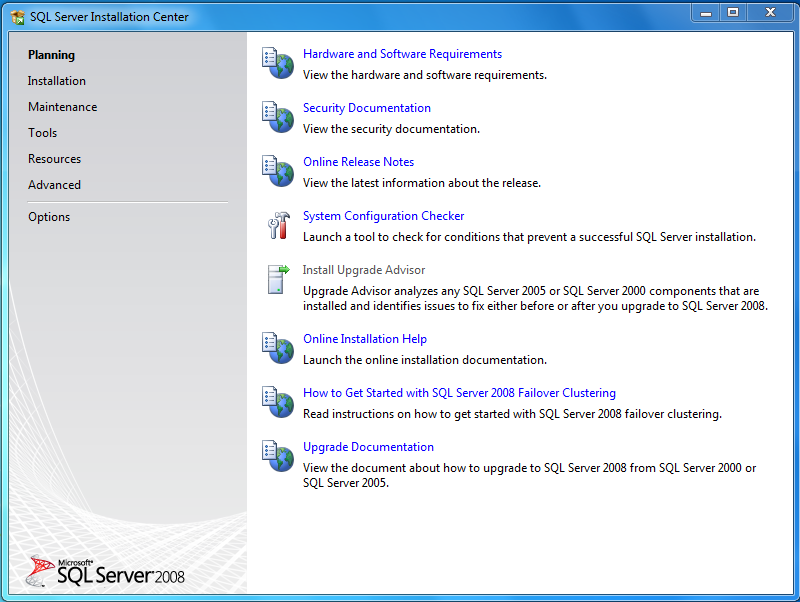
Step 1: Double click on the installer. It will take some time to extract. After that an window  will open as follow.
First window of installation
Step 1
Step 2: From this window click on the Installation menu (See Left). Now there will be appear some option under Installation. From right, click on the option New SQL Server stand-alone installation or add features to an existing installation.
Note: After Clicking on that a window may appear as bellow. Just click on the button Run Program of that.
Click Run Program
Note
Step 3: Now setup will take a moment to complete some operation. To continue there can not be any operation with status failed. If any operation fails then it will not be possible to continue installation. Click OK
Every operation should be passed
Step 4
Step 4: This is express edition so I do not need to enter any product key. Just Click on Next
Next
Step 4
Step 5: Check Accept the terms and click NEXT
Check Accept Terms & Condition and Click Next
Step 5
Step 6: Now Click Install button. Some setup support files will be installed.
Install Setup Support Files
Step6
Step 7: Now again It needs some operation to be completed. Every operation must be  passed or warning or skipped. If any operation fails then it is not possible to continue. Click Next.
There can not be any operation with failed status
Step 7
Step 8: Now select the features which do you need. Here I am selecting Database Engine Services, Busines Intelligence Development Studio, Management Tools basic & SQLl Client Connectivity SDK. Click Next.
Select Services
Step 8
Step 9: Here we need the name and instance ID. I am selecting Default Instance but keep the name “SQLExpress” in your mind for future use. Click Next.
Check Default instance
Step 9
Step 10: Now a window will appear  and it will show the space required and available. Click Next.
Click Next
Step 10
Step 11: Here select the account name from the dropdown list for SQL Server Database Engine-
NT AUTHORITY\NETWORK SERVICE and Click Next.
Select NT AUTHORITYNETWORK SERVICE
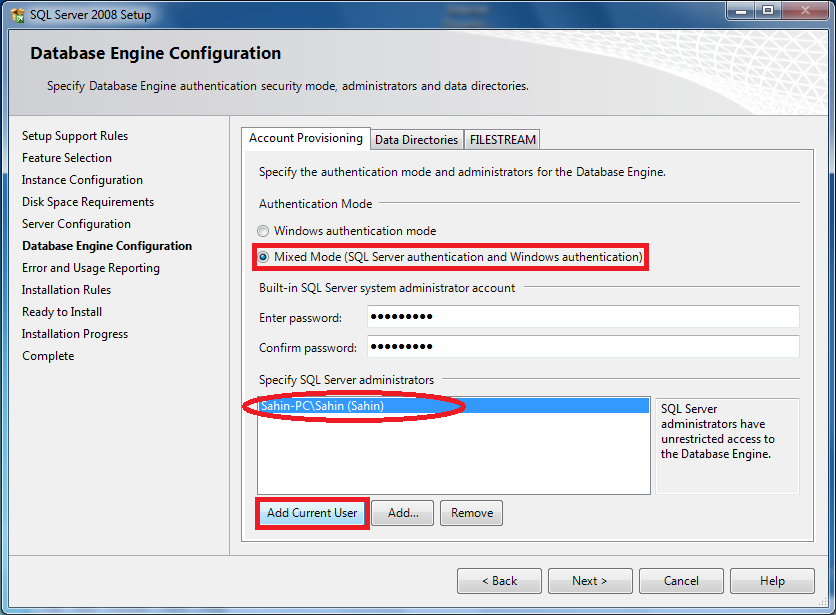
Step 12: Now select which mode do you want to use. Here I am selecting the Mixed mode.
For mixed mode I have to provide the password for the root account (username “sa” default) and adding my current user by which i will also be able to access database engine without default administrator account (username : sa ).
Select NT AUTHORITY\NETWORK SERVICE
Step 12
Step 13: Click Next
Click Next
Step 13
Step 14: Now again every operation must be passed or skipped. If there is any operation with status failed then installation will not be possible. Click Next
There must not be any operation with status failed.
Step 14
Step 15: Now finally it is going to start the installation. Click Install
Start Installation
Step 15
Step 16: Now wait till installation is complete. Setup is complete. Click Next
Next
Step 16
Step 17: Now Close this window
Close
Close
Exit this
Exit this
At last Exit this window


Tuesday, 25 June 2013

25th june 2013

BANKING SYSTEM
import java.util.Scanner;
public class BankApp {
public static void main(String[] args) {
    Scanner s = new Scanner(System.in);
    Bank myBank = new Bank();

    int user_choice = 2;

    do {
        //display menu to user
        //ask user for his choice and validate it (make sure it is between 1 and 6)
        System.out.println();
        System.out.println("1) Open a new bank account");
        System.out.println("2) Deposit to a bank account");
        System.out.println("3) Withdraw to bank account");
        System.out.println("4) Print short account information");
        System.out.println("5) Print the detailed account information including last transactions");
        System.out.println("6) Quit");
        System.out.println();
        System.out.print("Enter choice [1-6]: ");
        user_choice = s.nextInt();
        switch (user_choice) {
            case 1: System.out.println("Enter a customer name");
                    String cn = s.next();
                    System.out.println("Enter a opening balance");
                    double d = s.nextDouble();
                    System.out.println("Account was created and it has the following number: " + myBank.openNewAccount(cn, d));
                    break;
            case 2: System.out.println("Enter a account number");
                    int an = s.nextInt();
                    System.out.println("Enter a deposit amount");
                    double da = s.nextDouble();
                    myBank.depositTo(an, da);
                    break;
            case 3: System.out.println("Enter a account number");
                    int acn = s.nextInt();
                    System.out.println("Enter a withdraw amount");
                    double wa = s.nextDouble();
                    myBank.withdrawFrom(acn, wa);
                    break;
            case 4: System.out.println("Enter a account number");
                    int anum = s.nextInt();
                    myBank.printAccountInfo(anum);
                    break;
            //case 5: ... break;
        }
}
while (user_choice != '6');
}

static class Bank {
private BankAccount[] accounts;     // all the bank accounts at this bank
private int numOfAccounts;      // the number of bank accounts at this bank

// Constructor: A new Bank object initially doesn’t contain any accounts.
public Bank() {
    accounts = new BankAccount[100];
    numOfAccounts = 0;
    }

// Creates a new bank account using the customer name and the opening balance given as parameters
// and returns the account number of this new account. It also adds this account into the account list
// of the Bank calling object.
public int openNewAccount(String customerName, double openingBalance) {

    BankAccount b = new BankAccount(customerName, openingBalance);
    accounts[numOfAccounts] = b;
    numOfAccounts++;
    return b.getAccountNum();
}

// Withdraws the given amount from the account whose account number is given. If the account is
// not available at the bank, it should print a message.
public void withdrawFrom(int accountNum, double amount) {
    for (int i =0; i<numOfAccounts; i++) {
        if (accountNum == accounts[i].getAccountNum()  ) {
            accounts[i].withdraw(amount);
            System.out.println("Amount withdrawn successfully");
            return;
        }
    }
    System.out.println("Account number not found.");
    }

// Deposits the given amount to the account whose account number is given. If the account is not
// available at the bank, it should print a message.
public void depositTo(int accountNum, double amount) {
    for (int i =0; i<numOfAccounts; i++) {
        if (accountNum == accounts[i].getAccountNum()  ) {
            accounts[i].deposit(amount);
            System.out.println("Amount deposited successfully");
            return;
        }
    }
    System.out.println("Account number not found.");
}

// Prints the account number, the customer name and the balance of the bank account whose
// account number is given. If the account is not available at the bank, it should print a message.
public void printAccountInfo(int accountNum) {
    for (int i =0; i<numOfAccounts; i++) {
                if (accountNum == accounts[i].getAccountNum()  ) {
                    System.out.println(accounts[i].getAccountInfo());
                    return;
                }
            }
    System.out.println("Account number not found.");
}

// Prints the account number, the customer number and the balance of the bank account whose
// account number is given, together with last n transactions on that account. If the account is not
// available at the bank, it should print a message.
public void printAccountInfo(int accountNum, int n) {
    for (int i =0; i<numOfAccounts; i++) {
                        if (accountNum == accounts[i].getAccountNum()  ) {
                            System.out.println(accounts[i].getAccountInfo());
                            System.out.println(accounts[i].getTransactionInfo(n));
                            return;
                        }
                    }
    System.out.println("Account number not found.");
    }

}


  static class BankAccount{

       private int accountNum;
       private String customerName;
       private double balance;
       private double[] transactions;
       private int numOfTransactions;
       private  static int noOfAccounts=0;

       public String getAccountInfo(){
           return "Account number: " + accountNum + "\nCustomer Name: " + customerName + "\nBalance:" + balance +"\n";
       }

       public String getTransactionInfo(int n)
       {
            numOfTransactions = n;
            return n;

        }

       public BankAccount(String abc, double xyz){
         customerName = abc;
         balance = xyz;
         noOfAccounts ++;
         accountNum = noOfAccounts;
         transactions = new double[100];
         transactions[0] = balance;
         numOfTransactions = 1;
       }

    public int getAccountNum(){
        return accountNum;
    }
    public void deposit(double amount){

        if (amount<=0) {
            System.out.println("Amount to be deposited should be positive");
        } else {
            balance = balance + amount;
            transactions[numOfTransactions] = amount;
            numOfTransactions++;
        }
    }
    public void withdraw(double amount)
    {
        if (amount<=0){
             System.out.println("Amount to be withdrawn should be positive");
         }
        else
        {
            if (balance < amount) {
                System.out.println("Insufficient balance");
            } else {
                balance = balance - amount;
                transactions[numOfTransactions] = amount;
                numOfTransactions++;
            }
        }
    }

}//end of class
}